Showing posts with label Google. Show all posts

Monday, February 08, 2010

Voting with your Feet coming to Fruition? Google Maps Suggests Places You Might Like


At Intel Research in 2005, I ran a study called "Voting with your Feet" that examined the relationship between a person's place preferences and their place visit behaviors. We were exploring a simple question: could a location-based system make recommendations about places that you might like based on your travel history? We looked at features like travel distance, place visit frequency, whether you visited the place alone or with others...

Our results were mixed (see UbiComp2006 paper here); it turns out, place visit behaviors are a fairly noisy signal when it comes to expressing an implicit preference. Although we tracked thousands of place visits, we only had the resources to follow 16 participants. Now, current technology like Yelp Mobile, Foursquare, and Google Latitude/Maps Mobile should make studying this question much easier. Indeed, Google now has "Google Map Suggest", which suggests places nearby that you may like. Although they are ambiguous about what features, exactly, they are using to make these recommendations, it's an interesting development for automated real-world recommendation systems.

Wednesday, July 09, 2008

Google Earth Crashes on Polygon Edit

Recently, Google Earth (4.3.7204.0836, Apr 24 2008) started crashing whenever I selected the "New Polygon" tool. Though the "New Polygon" dialog box would appear, I could not click on anything and the mouse icon, which is supposed to change to a cross hair (to place the polygon), would remain an arrow. Then, a crash report dialog would pop-up and I would be forced to close Google Earth. Quite frustrating. To fix this, I switched from using DirectX, which is the default, to OpenGL in the Tools->Options->3D View->Graphics Mode settings. I have heard that others have fixed this with enabling safe mode (located in the same settings dialog); however, this did not work for me. Apparently, there are some strange video card driver interactions occurring here.

Monday, July 07, 2008

Auto-Generate KML C# Classes

Using the xsd.exe tool (in a default installation, you can find it here: C:\Program Files\Microsoft Visual Studio 8\SDK\v2.0\Bin), you can auto-generate KML C# classes. Make sure you have ogckm122.xsd (here), atom-author-link.xsd (here), and xAL.xsd (here) in the directory where you are executing the xsd command.

>xsd /c ogckml22.xsd atom -author-link.xsd xAL.xsd

This will generate a C# file called ogckml22_atom-author-link_xAL.cs.

Thanks to these two blog posts for the help: xsd command and multiple xsd files and Error generating classes for schema 'MySchema.xsd'.

Wednesday, July 02, 2008

Google Maps Street View in Middle America

My sister's family lives in a small Nebraskan town with an estimated population of 3,000 people and an estimated median house value of $127,000 (was less than $100,000 in 2000). Nonetheless, Google has taken its mapping technology to these streets and captured my brother-in-law and niece on film (without their permission). It appears Google truly does want a visual index of all streets in America. Indeed, according to Wikipedia, "Google has stated that its ultimate goal is to provide street views of the entire world, although the company has not disclosed in advance the exact dates when any particular locations will be added"

Now, there have been plenty of write-ups online about the chilling implications of this technology from a privacy standpoint (see end of this post). Admittedly, I had not paid much attention to said implications until now. What I find startling here is not just that my family was captured on film and automatically uploaded by Google but that this picture was taken while my brother-in-law was on his private property in front of his own house (with my little niece no less). Further, if you click on the "Full-screen" link, the Street View photo itself increases in size, which is even more unsettling. It just makes one feel invaded. Note, here, however that there is evidence that Google is running automatic face detection algorithms and blurring faces. Automatic face detection is pretty much considered a solved problem in the computer vision world (face detection is not the same thing as face recognition). It's difficult to tell if Google is in fact explicitly obscuring the face here or if the overall photo quality is just poor.


Although the photo quality published online is rather low, I would not be surprised if the original captured image was of much higher quality, which likely still resides in a Google database somewhere. I would imagine that Google has plans to apply computer vision algorithms for automatic object detection, 3D-routing, sign reading, sidewalk routing (for people routing, rather than car routing), etc. Thus, there would be little reason for them to invest the money into Street View and not capture the highest quality imagery possible.

Some related links
Wikipedia's Google Street View page has a Privacy issues section as well as a long list of links to articles and news items related to Street View's growth, governmental concerns, and privacy implications:

Privacy advocates have objected to this Google feature, pointing to views found to show men leaving strip clubs, protesters at an abortion clinic, sunbathers in bikinis, cottagers at public parks, parents hitting their children, males picking up prostitutes and other activities, as well as people engaging in activities visible from public property in which they do not wish to be seen publicly.[19] Google maintains that the photos were taken from public property. Before launching the service, Google removed photos of domestic violence shelters, and allows users to flag inappropriate or sensitive imagery for Google to review and remove.[20] When the service was first launched, the process for requesting that an image be removed was not trivial;[21] however, Google has since changed its policy to make removal more straightforward.[22] Images of potential break-ins, sunbathers and individuals entering adult bookstores have, for example, remained active and these images have been widely republished.[23]

Mashable has a Top 15 Google Street View Sightings page including pictures of a possible crime in progress, female sunbathers, and men coming/going from adult related entertainment venues. Some more Street View oddities are listed on this blog post. The New York Times has an article entitled Google Zooms In Too Close for Some, which is also worth a look as it briefly explores the idea of public vs. private and ownership of data.

Friday, September 22, 2006

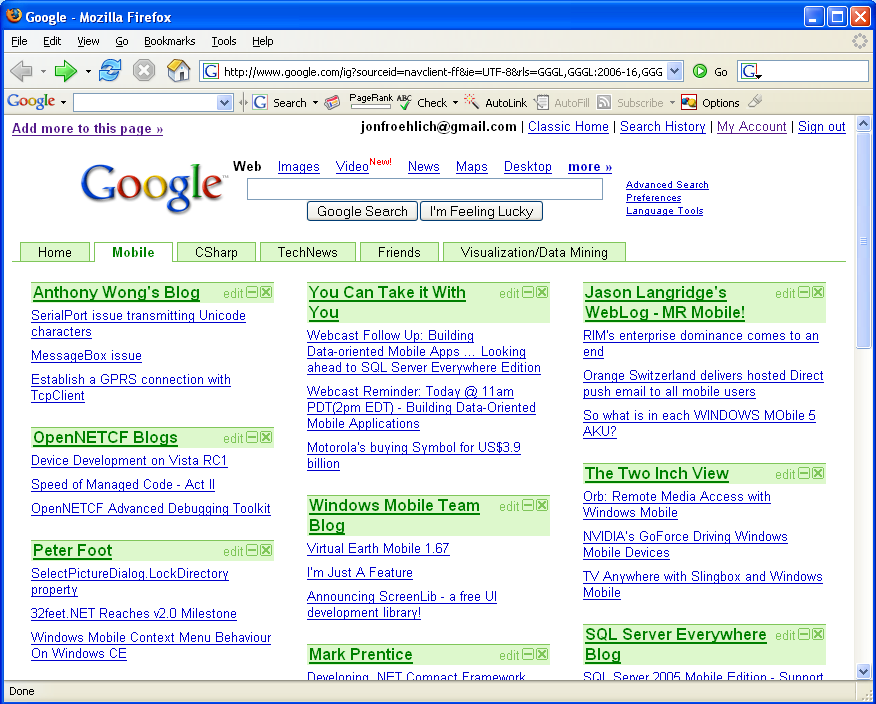
Google's "Add a Tab" Disappeared

I use Google Personalized homepage to keep track of some of my most read RSS feeds. They added a "tabs" feature a few weeks ago. However, now the "Add a tab" link has disappeared.

Before:
After:
Update 9/22/2006 @ 10:22AM: Aha. It turns out that Google instituted a max tab limit of 6. Someone found a hack around this limit however.

Saturday, August 12, 2006

Gates Apparently on Circumcision Promotion Tour

Google News aggregation makes for some interesting combinations of headlines. I saw this one last night and couldn't help but take a screenshot. The primary headline, "Circumcision promoted," actually has no accompanying graphic. The Bill Gates shot, shown just to the right of the "Circumcision promoted" text, is actually related to the third headline link: "AIDS Funding: Gates Steps Up as Rich Countries Step Back." However, given the proximity/layout of the Gates graphics and the Circumcision headline, it's easy to interpret that they are related.

Wednesday, February 15, 2006

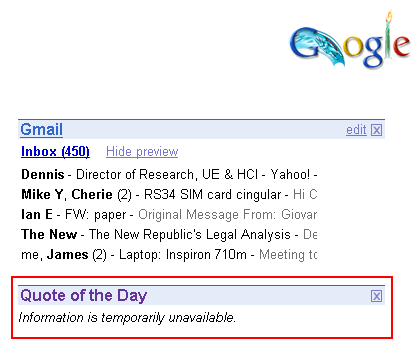
Google Quote of the Day

You know your day is going well when your personalized Google quote of the day is "Information is temporarily unavailable." Hmm, I wonder who said that.


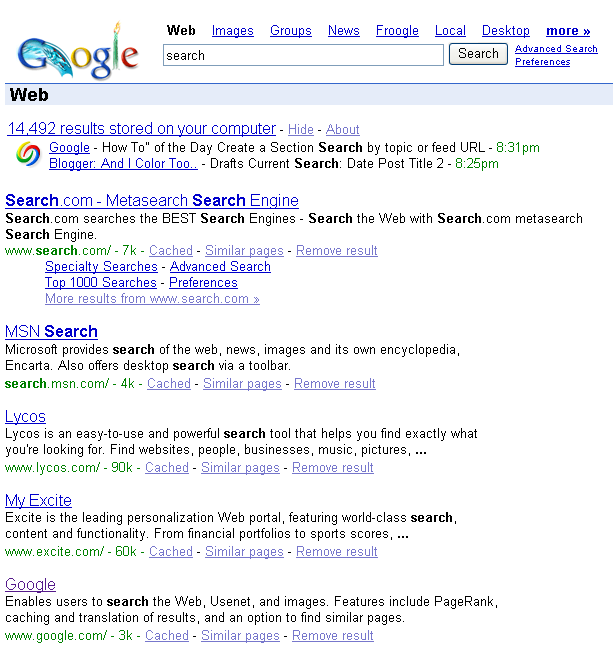
Also, in other Google news, my clever girlfriend found out today that if you search for "search" in Google, Google is actually the 5th result from the top behind MSN Search and Lycos of all things.

Thursday, February 09, 2006

UDub, (cough), Top of List, (cough)

http://vcmike.blogspot.com/2006/01/ranking-colleges-using-google-and-oss.html

Pretty cool use of Google regardless of the findings.

Update September 13, 10:17PM: Not that it makes much of a difference here, but I was trying to be tongue-in-cheek with this post. You see, I got to the University of Washington so I like any ranking in which it tops the list (well, any positively connoted ranking). Regardless, it's a great university.

Wednesday, January 25, 2006

video.google.com, worse than previously thought

I attempted to purchase and download the "Kobe vs. Raptors" video on Google last night. It was a frustratingly bad experience and, in the end, resulted in three failed downloads of the video. It gets worse...

Let's start at the beginning. Upon trying to purchase a Google video, you must create an account and submit credit card information. There is no visible information about whether Google will store the credit card data or not for future purchases; in addition, there is no checkbox to control whether my credit card data persists on Google's servers. This is of particular concern because my Google Video Store account is the same account that I use for GMail and "personalized Google."

Once you enter this information, Google prompts you to "login and complete your purchase." The login requirement here might seem a bit redundant here but is typical of online stores attempting to protect their customers. However, what's not typical is after you submit your login/password, the next screen asks you to "login and complete your purchase." Um, OK, so I thought I just did that. I try again. Same result. And again.... argh! OK, well, luckily I had actually expected this as a friend had IM'd me earlier in the day and said he had the same problem. I asked "Are you using FireFox?" He replies, "Yes." I say, "Switch to IE." Unfortunately, I was already using IE -- so, what to do? I decide to close all of my IE windows, restart IE, and reopen the video store - which, of course, requires that I go through Google Video's horrible interface once again to find the video.

Finally, I get through the "login and complete your purchase" screen and then Google notifies me that I must download their "Google Video Player." I'm also informed that once the video player downloads, my video will begin downloading automatically. Sadly, Google uses a pop-up window to download the video player and Google Toolbar blocks such things. Now, the "download" screen has dissapeared and I'm left with no video player or video (though I just received my e-mail receipt so I know the transaction has gone through). Hmm, I must go back up through the interface to get to a screen with a download button.

Eventually, I get to a "manual download" area and am able to download the video player. I install it and click on "download video." This link opens the video player which begins to presumably download the video. Of course, this doesn't work either. The first attempt fails after like 13 retries. The second attempt downloads 45 megs of the video in 2 hours (note that I've downloaded every episode of the Office via the iTunes Music Store -- each episode is about 250 megs, which takes 5 minutes or so to download). The third attempt, which I start before going to bed, downloads 63 megs but then prompts me for my login information again -- however, I am now sound asleep and unaware that the download stopped. I wake up and note that the video is only up to 63 megs (around 12:33AM -- ironically went to bed at 12:15) and that a modal dialog in the Google video player is waiting for my login information. After filling out the dialog, the download does not restart.

I started my fourth attempt before I left for work -- let's hope that it will be completed by the time I return home.

Tuesday, January 24, 2006

video.google.com: Worst Interface Ever

http://video.google.com has some of the absolute worst interfaces I've ever used -- which is quite startling given that it's google and their product/interface design follows Apple: less is more and minimalism is beautiful. However, they are clearly working on it as last night I spent like an hour exploring the interface and looking for the Kobe Bryant 81 point game vs. the Toronto Raptors. This afternoon I checked again and noted that, first, the interface was much different from last night (though still very lacking) and, second, the Kobe Bryant game is now online. At the very least, the NBA games are somewhat organized -- there exists a bit of a hierarchical structure rather than straight search.

Link to Kobe vs. Toronto.

Sunday, April 24, 2005

Gizoogle Mizaps.

Unexpected surprises with google maps (link).


Notable surprises include a just-erupted volcano, violent scenes from Iraq (a bomb going off in Baghdad and a firefight in Najaf) and even a 747 landing in Tokyo, something difficult to capture given that the satellite is moving at 17,000 mph. (See the picture gallery at left.)


I wonder if people took notice to such things with Microsoft's TerraServer and the like. These tools have been around for a while, no? I guess Google makes things mainstream (whether they want to be or not).