I have been a Dell customer since 1996, when I bought a Dell Pentium 166 equipped with a fancy 17 inch CRT for over $2,000. I've since purchased three more Dell desktops and three laptops and made recommendations to countless others.
My current Dell laptop, the XPS M1330, has been a lemon almost since the beginning. Purchased in March of 2008 by April it had already exhibited strange behaviors, which I attributed to Vista. By mid-April, Vista blue-screened and I could not reboot even in safe-mode. Unfortunately, I was traveling in Europe at the time. My laptop became a brick that I had to lug around Italy and Greece. When I returned to the US, I spent two days reformatting the drive and installing applications from scratch. This was the first time I have ever had a computer fail to the point of requiring a complete reformat and yes I am a lifelong Windows user (maybe I've been lucky?).
At the present time I am again in Europe for business and, once again, my Dell XPS M1330 has failed me. This time, no amount of technical knowledge can solve the problem--I've been hit by the
defective NVIDIA GPU issue. On Sunday (five days ago), my laptop screen started to freeze up and automatically reboot. This happened seven times in five hours (I'm stubborn and I was working on a deadline). Now my laptop refuses to boot at all--or, more accurately, boots with these beautiful vertical lines (see below). And no, plugging in an external monitor does NOT fix the issue. This is a video card problem, not a monitor problem. I should note that I am extremely reliant on my laptop--it is my primary computer (I'm almost like a Mac person in that way... perhaps I should take the hint and switch to a Mac?). Thus, I have incurred considerable cost in work time trying to remedy this issue not to mention the fact that I am now stuck in Europe without a computer.
 An early indication of failure?
Fortunately, Dell support has been incredibly responsive, answering my requests for help only hours after the initial email. However, since I am in Europe they want me to upgrade to international warranty coverage in order to receive support here. I most certainly do not want to blow this out of proportion but that offer seems a bit ridiculous. You would think that in the case of a known hardware defect, they would make some compromises in their regular procedures. From a Dell support email:
...since you are in Europe right now, if a service call needs to be processed to repair your system, I do regret to inform you that your current warranty does not support International coverage. You can either return first to U.S and have your system serviced there, or Transfer your system's ownership to Spain so Dell Spain Support will be the one assisting your for this matter, or lastly you can contact our Ext Warranty Department at 800 247-4618 to upgrade your warranty to have an International Support so we can process your request and provide service on any country that are covered by Dell International Warranty support.
Some Background on the IssueIn early July, NVIDIA informed stockholders of the
problem:
...the company just informed investors that "significant quantities" of previous-generation graphics chips have been failing at "higher than normal rates," and that it's lowering its Q2 estimates due to pricing pressure. NVIDIA will be taking a $150M to $250M charge against earnings next quarter to cover the cost of repairing and replacing the affected chips, but didn't specifically announce what products were defective, just that they include GPUs and "media and communications processors." Laptop makers have apparently already been given an updated GPU driver which kicks in fans sooner to reduce "thermal stress" on the GPU, and NVIDIA says it's talking to its suppliers about being reimbursed for the faulty parts
Dell's initial strategy was to release a BIOS update, which essentially keeps the laptop's CPU fan on continuously to decrease the temperature. This
is a major kludge in my opinion but better than nothing, the major downsides are that #1, it does not really address the problem and #2, the resulting noise and decrease in battery life. From
engadget:
...quite a few NVIDIA GPUs have been acting up. Nothing new there. However, Dell's attempting to help its laptop owners out by making a few notable BIOS updates readily available for download. Apparently the issue "is a weak die / packaging material set, which may fail with GPU temperature fluctuations." In order to combat the problem, Dell's BIOS flashes "modify the fan profile to help regulate GPU temperature fluctuations," though the Round Rock powerhouse only promises that the updates will "help reduce the likelihood of GPU issues." Hit the read link and give it a go -- it can't hurt... we hope.
Many are upset with Dell's strategy here as a BIOS update
does not fix the problem, it only decreases the likelihood that it will occur. As many have pointed out, this could simply delay the problem until the laptop is out of its warrenty period. From the
Inquirer:
To make matters more laughable, the fix that NV is forcing on Dell, HP and everyone else does not fix the problem, it simply makes it less likely to occur during the warranty period. With HP now offering an extended warranty period, and Dell looking likely to do the same, this will only multiply the cost. Add in the fact that Nvidia is sending out defective parts as replacements (there are no good ones), and you have a recipe for a long and expensive tale.
On Monday of this week, perhaps as a result of HP offering a similar deal to customers, Dell released this statement on their
direct2dell blog:
NVIDIA GPU Update: Dell to Offer Limited Warranty Enhancement to All Affected Customers Worldwide. Dell will offer a 12-month limited warranty enhancement specific to this issue. For all customers worldwide, we plan to add 12 months of coverage for this issue to the existing limited warranty up to 60 months from the date of purchase for the following systems:
Where Do We Go From Here?However, what remains to be seen, is exactly where do Dell customers, like myself, go from here? It appears that there are, in fact, no good reliable NVIDIA video cards available and Dell is absolutely drowning in the problem. Also, from the
Inquirer:
"We just got our first casualty from the Nvidia mobile graphics [expletive deleted]. Laptop used by one of our senior engineers started acting up this past weekend. Won't boot except in SAFE mode. Called Dell, they tried a few things, gave up, stated it was the graphics module, and said that because they were SO swamped dealing with that issue, they were just going to send a completely new laptop!"
There are two messages here which have echoes in earlier emails received over the past few weeks. First is that Dell is replacing full laptops over this, contrary to what they claim (read the comments here and here for more). The second is that the small 'under control' problem is far from that. If they had a handle on it, they would not be so far behind and drowning in backorders. Anyone want to bet Dell isn't going to get stuck with the bill here?
If Dell chooses to send me a new laptop, I hope it's a laptop with an ATI mobile graphics card or even Intel's own integrated graphics chip. Many are asking whether Dell is still shipping laptop's with defective parts and whether replacement parts are also defective (there is speculation that NVIDIA still has not corrected the problem).
Some related posts:
Update 08/21/2008 6:07PM GMT +1: I just had an online chat with a Dell customer agent by the name of XPS_Michael_135201. Here's the transcript:
5:40:55 PM Agent: May I ask if you are in the united states currenty?
5:41:10 PM Me: i am not currently in the united states which is the essence of my problem
5:41:16 PM Me: i am traveling for business
5:41:37 PM Me: this makes my laptop even more significant to me
5:42:01 PM Agent: You need a new motherboard/integrated video card, sir
5:42:12 PM Me: that is true
5:42:26 PM Agent: This is a known Nvidia problem.
5:42:31 PM Me: yep, i know that
5:42:39 PM Me: but this is a dell system
5:42:45 PM Me: nvidia doesn't sell computers
5:42:57 PM Agent: have you contacted international support?
5:43:16 PM Me: i was informed by a previous support agent that i would need to "upgrade" my warrenty in order to receive international support
5:43:53 PM Agent: I would get you one immediately for next day service if you were in the United Sates
5:44:00 PM Me: Great. i am in Europe.
5:44:07 PM Me: let's talk about what you can do for me here
5:44:10 PM Agent: one, moment please
5:47:27 PM Agent: XPS_Michael_135201 pushes page, http://support.dell.com/support/topics/global.aspx/support/dellcare/international_travel?c=us&l=en&s=gen
5:48:03 PM Agent: you could place a local phone call to where you are at to get that replaced.
5:48:18 PM Agent: Is there anything else I can help you with today?
5:51:41 PM Me: ok, assuming i got the next day onsite service, would the replacement motherboard/gpu contain a new revision of the Nvidia hardware
5:53:13 PM Agent: The Nvidia problem, was a weak series of chips in the actual construction ( a weak die-cast) the replacement would not be from that line
5:53:25 PM Me: could i get an ATI chipset instead?
5:53:34 PM Me: or could i opt simply for the intel integrated video?
5:55:36 PM Agent: We can offer to replace it with a good part that is the same as what you purchaced.
5:57:41 PM Me: ok
5:58:10 PM Me: thank you for your help.
Update 08/22/2008 7:38PM GMT +1: Some people have asked for more pictures and a better description of how I knew my laptop was failing. It took five days from the first day of experiencing problems to complete failure (e.g., a completely dead laptop). My first indication that something was wrong occurred on Sunday, August 17th (six days ago now). I was using Excel and Word and then suddenly my screen would change color, look pixelated and Vista would freeze. This transformation usually lasted about 5-10 seconds before Vista would either blue screen or simply force-reboot my laptop. I had not heard of the NVIDIA GPU issues so I (ignorantly) thought this was yet another Vista bug. I do not have any photographs of my laptop screen in that state in Vista, unfortunately, but here is a picture I took on Monday when trying to run a diagnostic tool that froze mid-session:
 This is what the diagnostic screen should look like.
 You know things are bad when even the diagnostic tool crashes (note the vertical lines)
After Monday, things only got worse and by Thursday I could not boot my laptop at all. Or, more specifically, the laptop would boot and look like this:
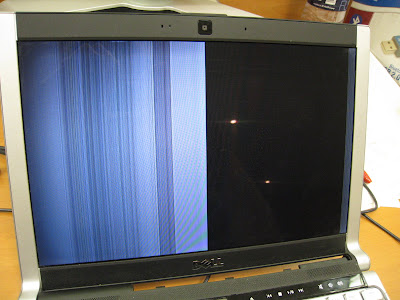
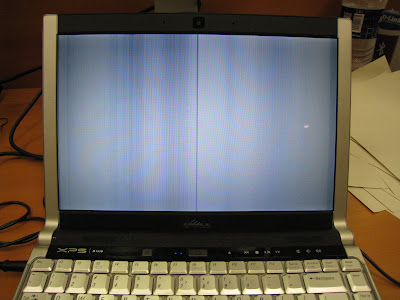 Update 08/25/2008 01:00PM GMT +1:
 Dell sent a service technician to fix my laptop, who, I must say was both incredibly efficient and friendly. Unfortunately because my Spanish is far from as good as my English, I was unable to gain much more information from the technician about how rampant and widespread this problem is. The "fix" for this issue, incidentally, is a whole new motherboard, which requires one to take nearly everything apart in the laptop and then put it back together. This particular technician had clearly dealt with many M1330 before as he was able to take apart the laptop, put in a new motherboard, and reconstruct the laptop in under 15-20 minutes.
Note that I am not certain whether this "new" motherboard is really new (or just a refurbished one). Nor am I aware of whether this "new" motherboard contains a fixed NVIDIA GPU. The BIOS software read A08 upon first boot. I immediately upgraded it to A12; however, the A08 number gives some indication as to the age of the laptop (e.g., when was the A09 BIOS firmware released?). Here are some pictures.
 The screen works!


